GammaLab
Python toolkit for soundcard gamma spectroscopy.
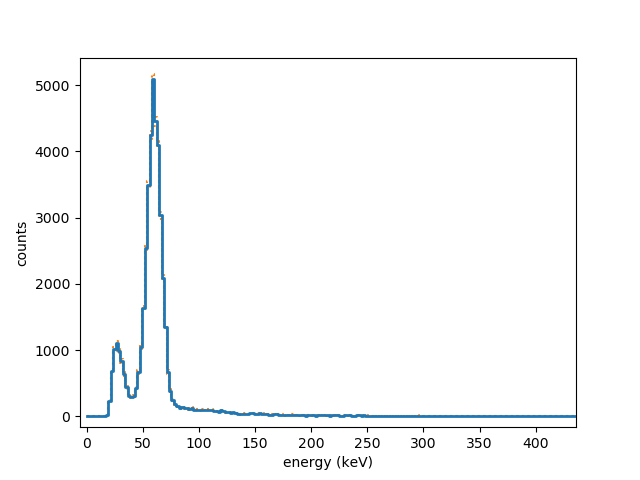
Spectrum of Am-241 acquired with a CsI(Tl) scintillation detector and Gamma Lab.
Introduction
This package is a Python package for the acquisition and analysis of soundcard data, specifically for gamma spectroscopy kits that use a soundcard as their ADC interface. It consists of independent building blocks (“services”) that can be connected and reconfigured to form different analysis pipelines. Examples of this are included in the repository in the examples directory.
Prerequisites
You need at least:
Python 3.6 or later,
numpy
matplotlib
the Python sound interface SoundCard
and recommended is:
scipy
Installation
Easiest is to use pip:
pip install GammaLab
Usage
Two example ready made example applications are included in a pip install.
The program `gammalab-monitor.py` lets you directly inspect the
data coming from the soundcard (e.g. to confirm you indeed use the right
sound interface or the manually fine tune the volume gain). Also it lets
you record a data stream for later analysis with
`gammalab-histogram.py --raw_ouput_file <outfile>`.
To get usage info:
> gammalab-monitor.py --help
For example:
> gammalab-monitor.py --list_input_devices
will list the available soundcard devices for data acquisition.
Another program, `gammalab-histogram.py` program acquires data, provides counts
and optionally plots a gamma spectrum. Again, you can get help:
> gammalab-histogram.py --help
This provides only a limited preview of the possibilities that the Gamma Lab offers. You can compose your own applications, examples of this are in the examples directory.
More details
The applications consist of components “services” that are connected with “wires.” For a component to be included it needs to be imported and instantiated, for example you almost always need:
from gammalab.acquisition import Soundcard
soundcard=Soundcard()
After instantiating additional components, say:
from gammalab.backend import SaveRaw
save=SaveRaw()
they need to be “wired”:
soundcard.plugs_into(save)
At the moment, components can have one input and one output, but an output can be connected to multiple components. When all components are wired, you start the pipeline:
main(timout=100)
The time-out is optional. The application will run until <enter> is pressed or until the time-out reached.
The following services are available:
from gammalab.acquisition import SoundCard
from gammalab.acquisition import Noise
from gammalab.acquisition import FileReplay
from gammalab.transform import Raw2Float
from gammalab.transform import DownSampleMaxed
from gammalab.transform import Normalize
from gammalab.transform import Int162Float
from gammalab.transform import Float2Int16
from gammalab.analysis import PulseDetection
from gammalab.analysis import FittedPulseDetection
from gammalab.analysis import Histogram
from gammalab.analysis import Count
from gammalab.backend import SoundCardPlay
from gammalab.backend import Monitor
from gammalab.backend import SaveRaw
from gammalab.backend import SaveWav
And a number of plotting services:
from gammalab.backend import Monitor
from gammalab.backend import PlotHistogram
from gammalab.backend import CountPlot
from gammalab.backend import PulsePlot
Note that most of these provide rudementary implementations and are open to improvement, though the code is somewhat conceptual in nature and probably will never be the most optimized.
Development
It is not difficult to program additional services.
A service is a class with at least the methods: start stop and
close. A service which accepts input should instantiate a “wire”
class defining its input and have connect_input and receive_input methods
(normally taken care of by deriving from ReceivingService class). If it
generates output, the service should have an output_protocol method, which
checks the input wire format and propagates any additional information to
the wire. It also needs to have some methods normally implemented by
deriving from the SourceService class (notably the `plugs_into`
method).
Services start up a seperate multiprocessing thread to do their computations. The simplest example of a service with input and output is the following:
class Identity(ThreadService, SourceService, ReceivingService):
    input_wire_class=FloatWire
    output_wire_class=FloatWire

    def output_protocol(self, wire):
        super().output_protocol(wire)
        wire.CHANNELS=self.input_wire.CHANNELS
        wire.RATE=self.input_wire.RATE
        wire.FORMAT=self.input_wire.FORMAT

    def process(self, data):
        return data
This service just forwards the input data (a dict containing a key data
with the data as float32 stream) to its output, retaining its sample rate, format
and number of channels.In this case the necessary start etc methods are
provided by inheritance from ThreadService. The process method defines the
actual processing done. The function `output_protocol` defines immutable
meta data for the output (`CHANNELS` etc), and checks whether the wires
are correctly connected.
Documentation of included tools
Three tools are distributed with the GammaLab package: `gammalab-monitor.py`, `gammalab-histogram.py`
and `gammalab-calibration-calc.py`. The first tool `gammalab-monitor.py` can be used to monitor and/or
save the soundcard data:
gammalab-monitor plots raw detector (soundcard) values.
usage: gammalab-monitor [-h] [--input_device_name INPUT_DEVICE_NAME]
                        [--runtime RUNTIME] [--list_input_devices]
                        [--list_output_devices]
                        [--raw_ouput_file RAW_OUTPUT_FILE]
                        [--output_device_name OUTPUT_DEVICE_NAME]
                        [--infile INPUTFILE]
Named Arguments
- --input_device_name
select input device by (fuzzy matched) name
Default: “”
- --runtime
runtime in seconds
- --list_input_devices
list all input devices
Default: False
- --list_output_devices
list output soundcard devices
Default: False
- --raw_ouput_file
optionally record raw data stream to provided filename (for later analysis)
Default: “”
- --output_device_name
optional output device for playback (fuzzy matched by name)
Default: “”
- --infile
Optionally playback from input file
The second, `gammalab-histogram.py`, can be used to generate and visualize histogram data for the detected
gamma ray pulses, and a couple of other things:
gammalab-histogram makes a histogram of detected peak heights.
usage: gammalab-histogram.py [-h] [--raw] [--nchannels NCHANNELS]
                             [--vmax VMAX] [--baseline BASELINE]
                             [--negative_peaks] [--amplitude AMPLITUDE]
                             [--threshold THRESHOLD] [--offset OFFSET]
                             [--scale SCALE] [--drift DRIFT] [--fitpulse]
                             [--fit-threshold FIT_THRESHOLD]
                             [--outfile OUTFILE] [--runtime RUNTIME]
                             [--do-plot] [--log]
                             [--histogram_mode HISTOGRAM_MODE]
                             [--time_normalized] [--plot_excess]
                             [--background BACKGROUND] [--plot_count]
                             [--plot_pulses]
                             [--input_device_name INPUT_DEVICE_NAME]
                             [--infile INPUTFILE] [--realtime]
Named Arguments
- --raw
histogram of normalized raw detector values (no calibration)
Default: False
- --nchannels
number of channels per MeV (bins) in the histogram
Default: 100
- --vmax
maximum energy bin for histogram (keV, ignored for –raw)
Default: 2000
- --baseline
signal baseline (raw value)
Default: 0.0
- --negative_peaks
inverted (negative peak) signal
Default: False
- --amplitude
max signal amplitude for normalization (raw value)
Default: 1.0
- --threshold
(noise) threshold for pulse detection (normalized raw value)
Default: 0.003
- --offset
signal energy offset (in keV)
Default: 0.0
- --scale
signal energy scale (in keV, ignored for –raw)
Default: 5400
- --drift
second order correction parameter (fractional deviation at raw value 1)
Default: 0
- --fitpulse
use pulse fitting for amplitude?
Default: False
- --fit-threshold
minimum peak to determine amplitude through fitting (normalized raw value)
Default: 0.95
- --outfile
output file root
- --runtime
runtime in seconds
- --do-plot
show histogram plot
Default: False
- --log
plot histogram with logarithmic y-axis
Default: False
- --histogram_mode
mode for histogram binning (normal, proportional, semiprop, quadratic)
Default: “normal”
- --time_normalized
plot time normalized histogram
Default: False
- --plot_excess
Plot excess counts in histogram (needs –background)
Default: False
- --background
optional filename for background spectrum in histogram plot (recommended to add –time_normalized)
Default: “”
- --plot_count
show plot of counts
Default: False
- --plot_pulses
Plot sampling of pulse shapes
Default: False
- --input_device_name
select input device by (fuzzy matched) name
Default: “”
- --infile
(optional) input file
- --realtime
file input in realtime
Default: False
Finally, `gammalab-calibration-calc.py` is a little tool to calculate calibration data from raw value, energy
pairs (e.g. determined by reading it off from a `--raw` histogram):
Determine scale and drift parameters from calibration data
usage: gammalab-calibration-calc.py [-h] [--order ORDER] [--no_offset]
                                    [--write_ini]
                                    [data [data ...]]
Positional Arguments
- data
calibration data: a list of space sperated <raw value>,<energy> pairs, e.g.: 0.1,100 0.5,500.
Named Arguments
- --order
order of calibration polynomial fit (1 or 2)
Default: 2
- --no_offset
force offset to be 0.
Default: False
- --write_ini
write calibration data to a file (gammalab.ini)
Default: False